
Analytics data model
Temps collects page views, sessions, custom events, Core Web Vitals and errors from your apps, and stores them in the PostgreSQL/TimescaleDB database on your own server. Visitors are identified by two first-party cookies the Temps proxy sets; session replay is off unless you turn it on. This page describes what each record contains and where it's stored. To set up collection, see Analytics.
How data flows
The browser SDK sends events to /api/_temps/* on your app's own domain. For apps deployed on Temps, the proxy answers those paths and records the event; it doesn't go through your app's code. The request flow page shows where this happens in the proxy pipeline.
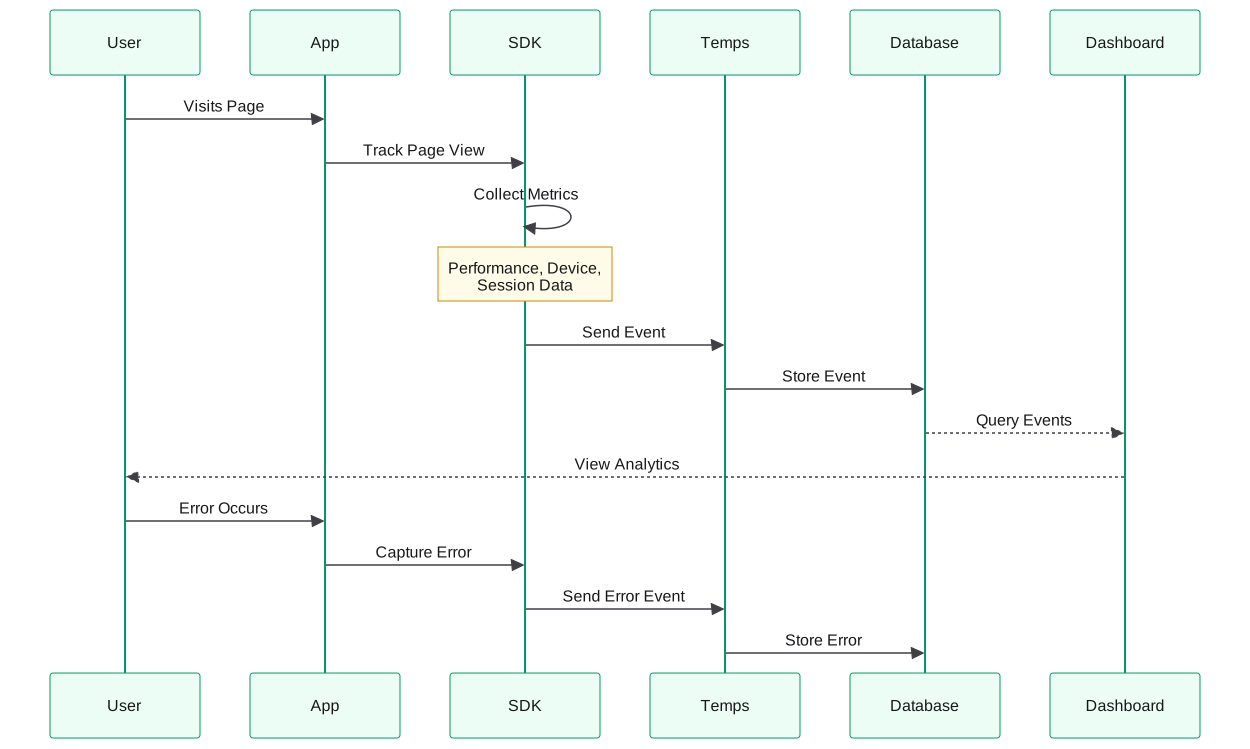
In words: when a user visits a page, the SDK in your app records the page view with performance, device and session data and sends it to Temps, which stores it in the database that the dashboard reads. Errors follow the same path: the SDK captures the error, sends it to Temps and Temps stores it.
Data structures
Analytics Events
Every page view and custom event is stored with the following fields (shown as TypeScript for readability):
interface AnalyticsEvent {
  // Identifiers
  id: number;
  timestamp: Date;
  project_id: number;
  environment_id?: number;
  deployment_id?: number;

  // Session Tracking
  session_id?: string;
  visitor_id?: number;

  // Page Data
  hostname: string;
  pathname: string;
  page_path: string;        // For analytics grouping
  href: string;
  querystring?: string;
  page_title?: string;
  referrer?: string;
  referrer_hostname?: string;

  // Session Flow
  is_entry: boolean;        // First page in session
  is_exit: boolean;         // Last page in session
  is_bounce: boolean;       // Single-page session
  time_on_page?: number;    // Seconds on page
  session_page_number?: number;

  // User Interactions
  scroll_depth?: number;    // Percentage scrolled
  clicks?: number;          // Click count on page
  custom_properties?: Record<string, any>;

  // Performance Metrics (Core Web Vitals)
  lcp?: number;             // Largest Contentful Paint
  cls?: number;             // Cumulative Layout Shift
  inp?: number;             // Interaction to Next Paint
  fcp?: number;             // First Contentful Paint
  ttfb?: number;            // Time to First Byte
  fid?: number;             // First Input Delay

  // Device & Browser
  browser?: string;
  browser_version?: string;
  operating_system?: string;
  operating_system_version?: string;
  device_type?: string;     // mobile, desktop, tablet
  screen_width?: number;
  screen_height?: number;
  viewport_width?: number;
  viewport_height?: number;

  // Geography (cached)
  ip_geolocation_id?: number;

  // Traffic Source
  channel?: string;         // organic, direct, referral, etc.
  utm_source?: string;
  utm_medium?: string;
  utm_campaign?: string;
  utm_term?: string;
  utm_content?: string;

  // Event Details
  event_type: string;       // page_view, custom_event, etc.
  event_name?: string;      // For custom events
  props?: Record<string, any>; // Custom event properties

  // Metadata
  user_agent?: string;
  is_crawler: boolean;
  crawler_name?: string;
  language?: string;
}
Error Events
Error tracking stores each error with its context. Errors arrive through the Sentry-compatible DSN or the SDK:
interface ErrorEvent {
  id: number;
  error_group_id: number;
  project_id: number;
  environment_id?: number;
  deployment_id?: number;
  visitor_id?: number;
  timestamp: Date;

  // Error Details
  exception_type: string;      // Error, TypeError, etc.
  exception_value?: string;     // Error message
  fingerprint_hash: string;     // For grouping similar errors
  source?: string;              // sentry, custom, etc.

  // Structured Context
  data?: {
    // User Context
    user?: {
      user_id?: string;
      email?: string;
      username?: string;
      ip_address?: string;
      segment?: string;
      session_id?: string;
      custom?: Record<string, any>;
    };

    // Device Context
    device?: {
      browser?: string;
      browser_version?: string;
      os?: string;
      os_version?: string;
      device_type?: string;
      screen_width?: number;
      screen_height?: number;
      viewport_width?: number;
      viewport_height?: number;
      locale?: string;
      timezone?: string;
    };

    // Request Context
    request?: {
      url?: string;
      method?: string;
      headers?: Record<string, string>;
      query_string?: string;
      cookies?: Record<string, string>;
    };

    // Stack Trace
    stack_trace?: Array<{
      filename?: string;
      function?: string;
      lineno?: number;
      colno?: number;
      in_app?: boolean;
    }>;

    // Environment
    environment?: {
      sdk_name?: string;
      sdk_version?: string;
      release?: string;
      dist?: string;
    };
  };
}
Where the data is stored
| Data | Storage |
|---|---|
| Analytics events and sessions | TimescaleDB hypertable in the Temps PostgreSQL database |
| Session recordings | TimescaleDB, only when session replay is enabled |
| Error events and groups | PostgreSQL tables |
| Visitor location | Resolved on your server with a local GeoLite2 database; stored as a cached geolocation ID |
Analytics events can also be replicated to ClickHouse for large workloads; PostgreSQL stays the system of record. See Migrate to ClickHouse. For disk usage and retention defaults, see Observability Storage.
Sending data from your app
For React and Next.js, wrap your app in the provider from @temps-sdk/react-analytics:
import { TempsAnalyticsProvider } from '@temps-sdk/react-analytics';

<TempsAnalyticsProvider>{children}</TempsAnalyticsProvider>
You don't need an API route, API key or project slug in your app: the provider posts to /api/_temps on the same origin, and the Temps proxy handles it. Custom events go through useTrackEvent(), which fills the event_name and props fields above. The full API is in the React Analytics SDK reference, and other frontends are covered in Analytics setup.
To attach user details (such as an account ID or plan) to a visitor, enrich the visitor from your backend with the Node SDK. The React SDK's identify() is currently a no-op.
What gets tracked automatically
Once the provider is in place, Temps records:
- Page views — every route change (
pushStateandpopstate) - Sessions and visitors — through the proxy's first-party cookies
- Time on page — through page-leave and engagement heartbeat events
- Core Web Vitals — LCP, CLS, INP, FCP and TTFB
- Device information — browser, OS, device type and screen size
- Traffic sources — referrer, channel and UTM parameters
- Location — country, region and city from the visitor's IP, resolved locally
Session replay is off by default. When you enable it, it records DOM changes and input events with every input value masked; it doesn't capture console output or network requests. See Session Replay.
The dashboards built on this data are described in Analytics, Error Tracking and Monitoring.
Data privacy and control
- Self-hosted — Events, recordings and errors are stored on your server and aren't sent to a Temps-operated service.
- Two first-party cookies — The proxy sets
_temps_visitor_id(kept for 365 days) and_temps_sid(expires after 30 minutes of inactivity), both HttpOnly on your own domain. No third-party cookies are set. Depending on your jurisdiction, these cookies may need visitor consent. - No personal data by default — Names, emails and account IDs are only stored if your app attaches them.
- Local geolocation — IP addresses aren't sent to an external service to resolve location.
For retention, deletion, consent and GDPR considerations, see Data Ownership and Privacy.
Related concepts
- Projects and Environments — the
project_idandenvironment_idon every record - Deployments — the
deployment_idthat ties events and errors to a release - Request Flow — how the proxy sets the visitor cookies and serves
/api/_temps