
Request Flow
Every request to a Temps-hosted application passes through the Pingora proxy built into the temps binary. It terminates TLS, checks the global IP block list, maps the Host header to a project and environment, wakes the environment if it is asleep, runs the attack-mode challenge when it is on, and forwards the request round-robin to one of the environment's containers, logging it on the way out.
For how the proxy fits into the rest of Temps, see Single-Binary Architecture.
Overview
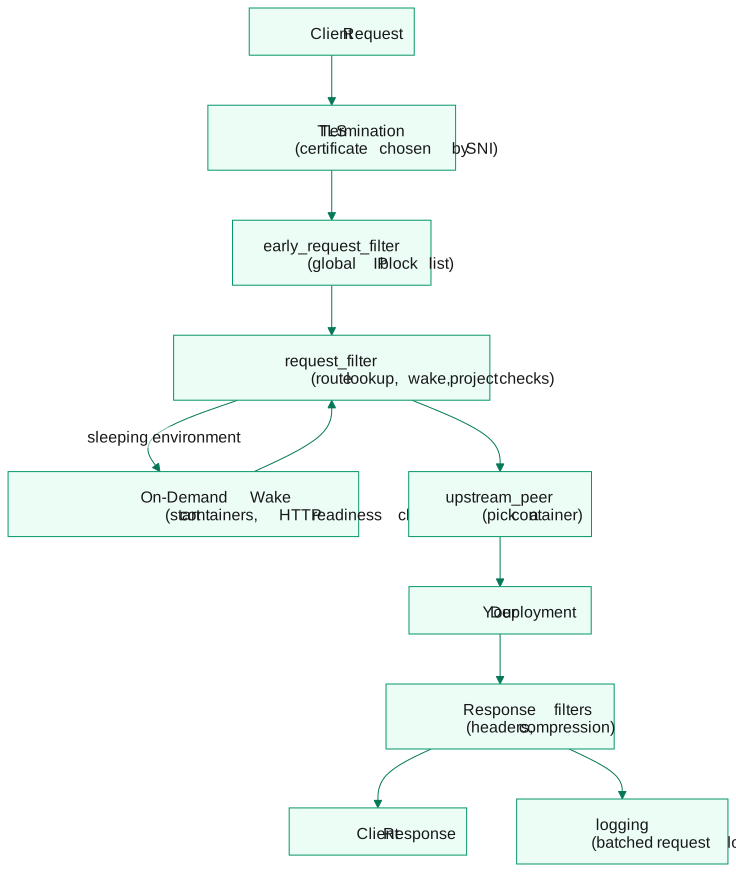
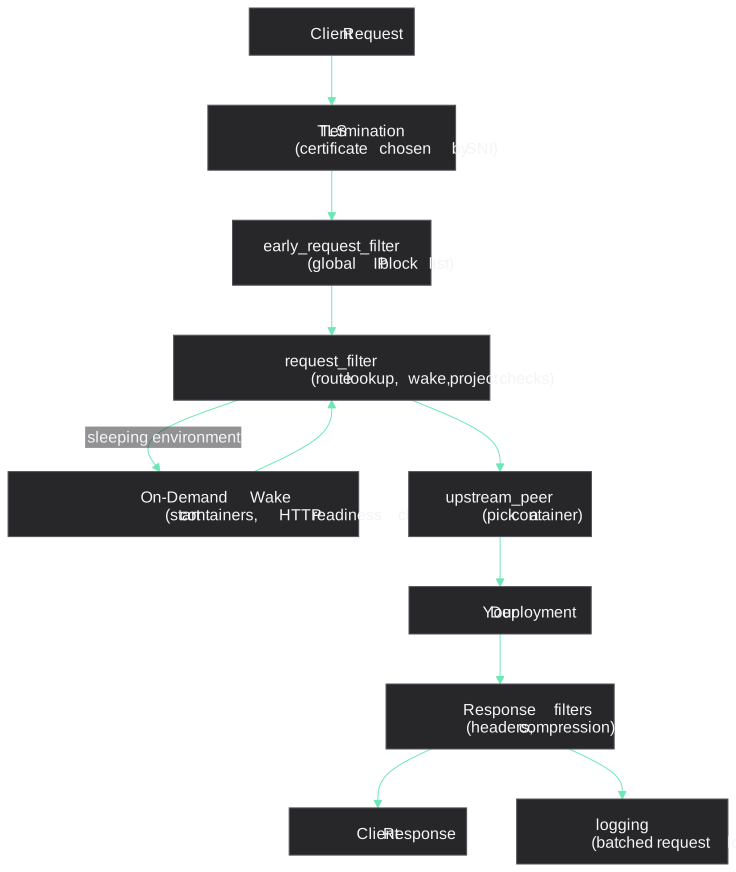
Every request to your Temps-hosted application goes through the same pipeline: TLS termination, a global IP block check, route resolution, optional security checks for the project, and then forwarding to one of the environment's containers. Sleeping environments are woken on the way.
High-Level Flow
Process modes
Temps can run as a single combined process or as two separate processes (see Two processes). The mode you are running determines how the proxy and the console coordinate on route table updates and on-demand wakes.
Combined Mode (default)
temps serve runs the Pingora proxy and the console API in the same OS process. The proxy listens on the addresses you pass with --address and --tls-address (the install guides use :80 and :443). The two share an in-process job queue, so route table updates are delivered through Job::ForceRouteReload without a network round-trip.
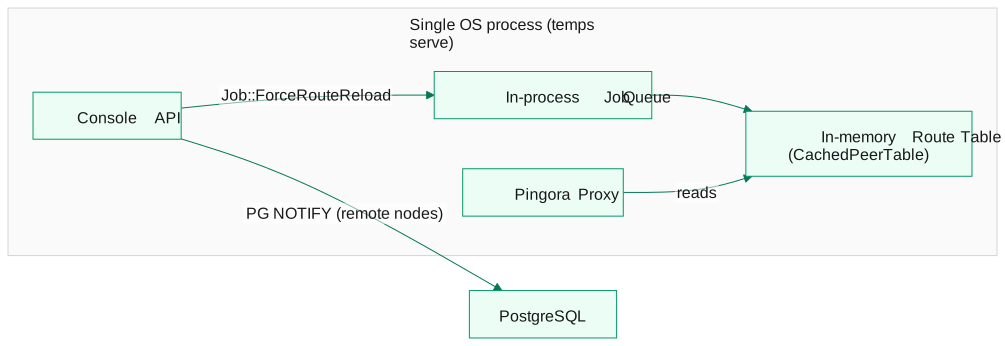
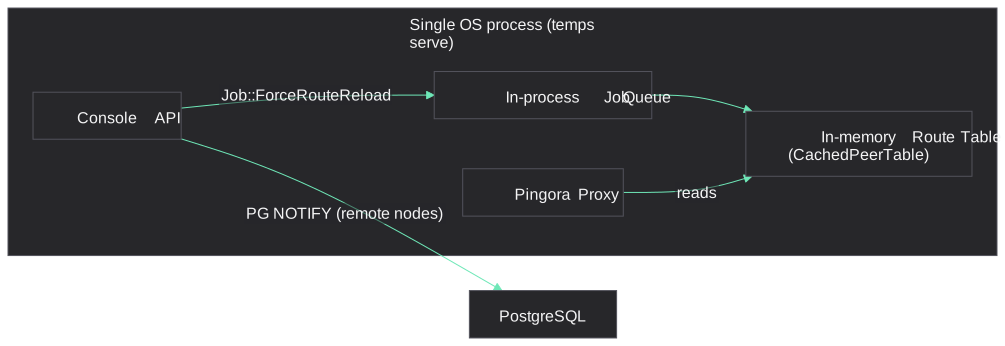
In words: in single-process mode the console API, the Pingora proxy, an in-process job queue and the in-memory route table all run in one temps serve process. A console change queues Job::ForceRouteReload, which rebuilds the route table the proxy reads; remote nodes are told through a PostgreSQL NOTIFY.
Split Mode (temps proxy + temps serve --role=console)
In split mode the Pingora proxy runs as its own OS process (temps proxy) and the console API runs as temps serve --role=console. Start the console with both --console-address and --proxy-address, and point temps proxy at the same --console-address.
The two processes share no memory:
- The proxy keeps its in-memory route table (
CachedPeerTable) fresh by listening on two PostgreSQLNOTIFYchannels:route_table_changes(RouteTableListener) andproject_route_change(ProjectChangeListener). - The in-process
Job::ForceRouteReloadpath is inert across processes: a job published by the console never reaches the proxy's queue, so route updates reach the proxy only throughNOTIFY. The ADR-017 design estimates this adds roughly 100–400 ms on a local database. - The proxy owns on-demand wakes: it starts sleeping containers itself through the local Docker socket. The console does not take part in waking.
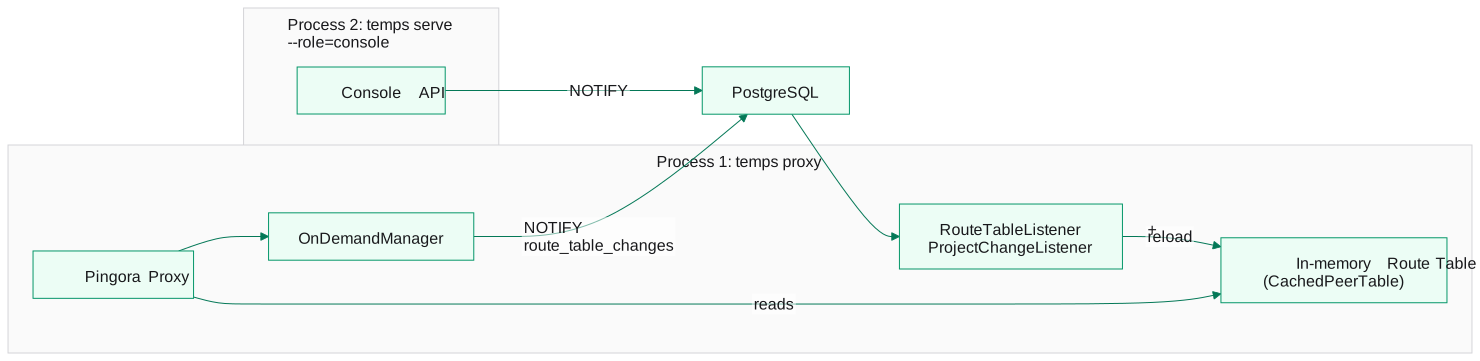
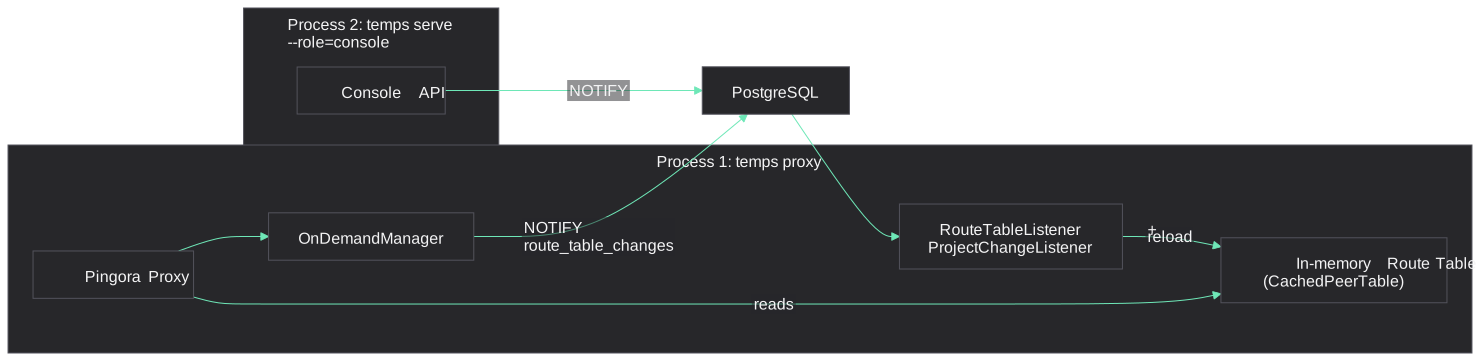
In words: in split mode the proxy (temps proxy) and the console (temps serve --role=console) are separate processes that share PostgreSQL. The console and the on-demand wake manager publish changes with NOTIFY, and listeners in the proxy process reload its in-memory route table.
The main reason to use split mode is upgrading the console without interrupting traffic: restarting the console process doesn't touch the proxy, which keeps its listening sockets. Schema migrations touching tables that the proxy reads must stay backward-compatible with the running proxy binary during the upgrade.
Split mode is available today (temps proxy + temps serve --role=console). Upgrades are manual: temps upgrade --split prints the restart steps rather than running them. For most deployments, combined mode (temps serve) is the right choice.
Request lifecycle
Complete Request Flow
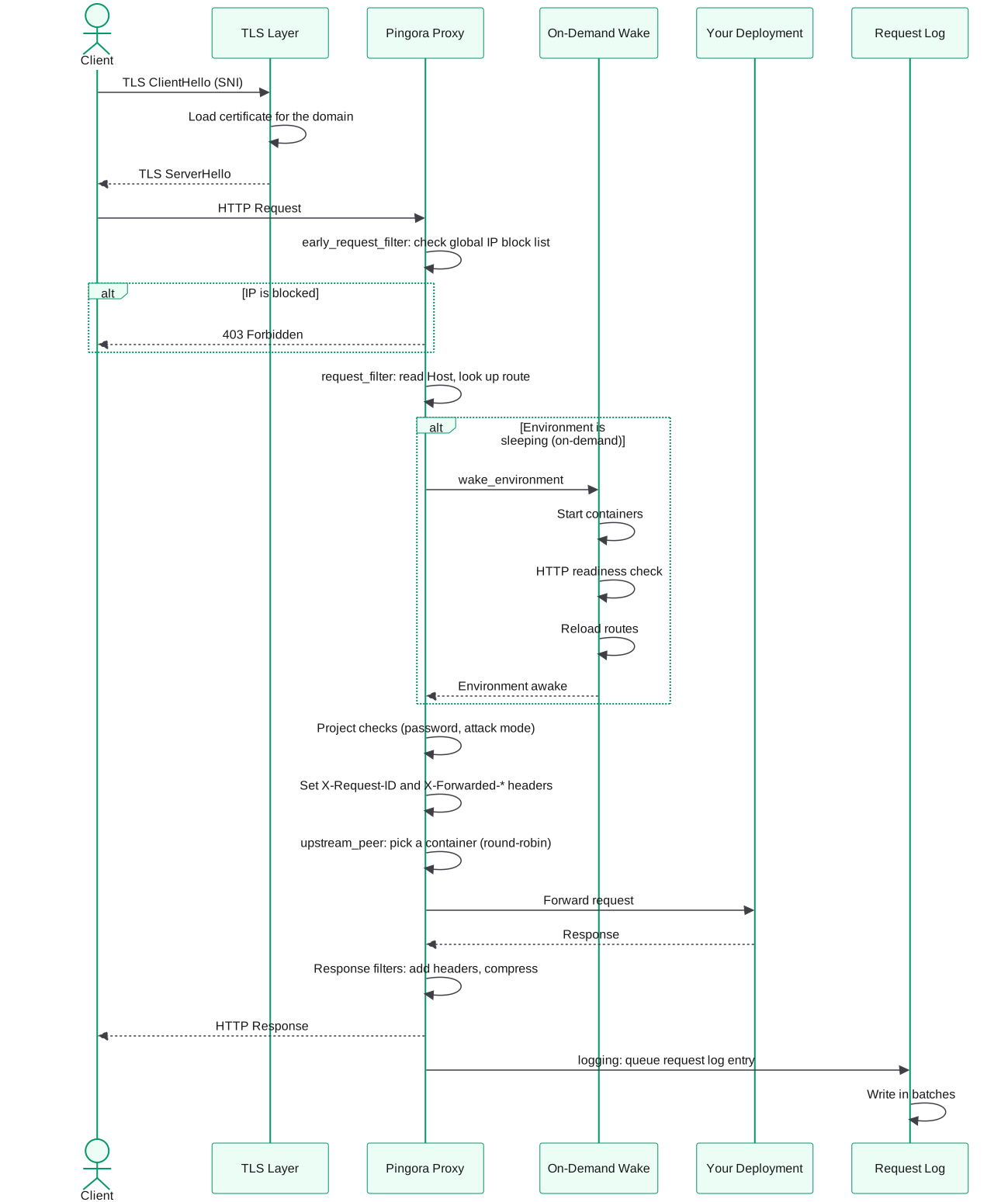
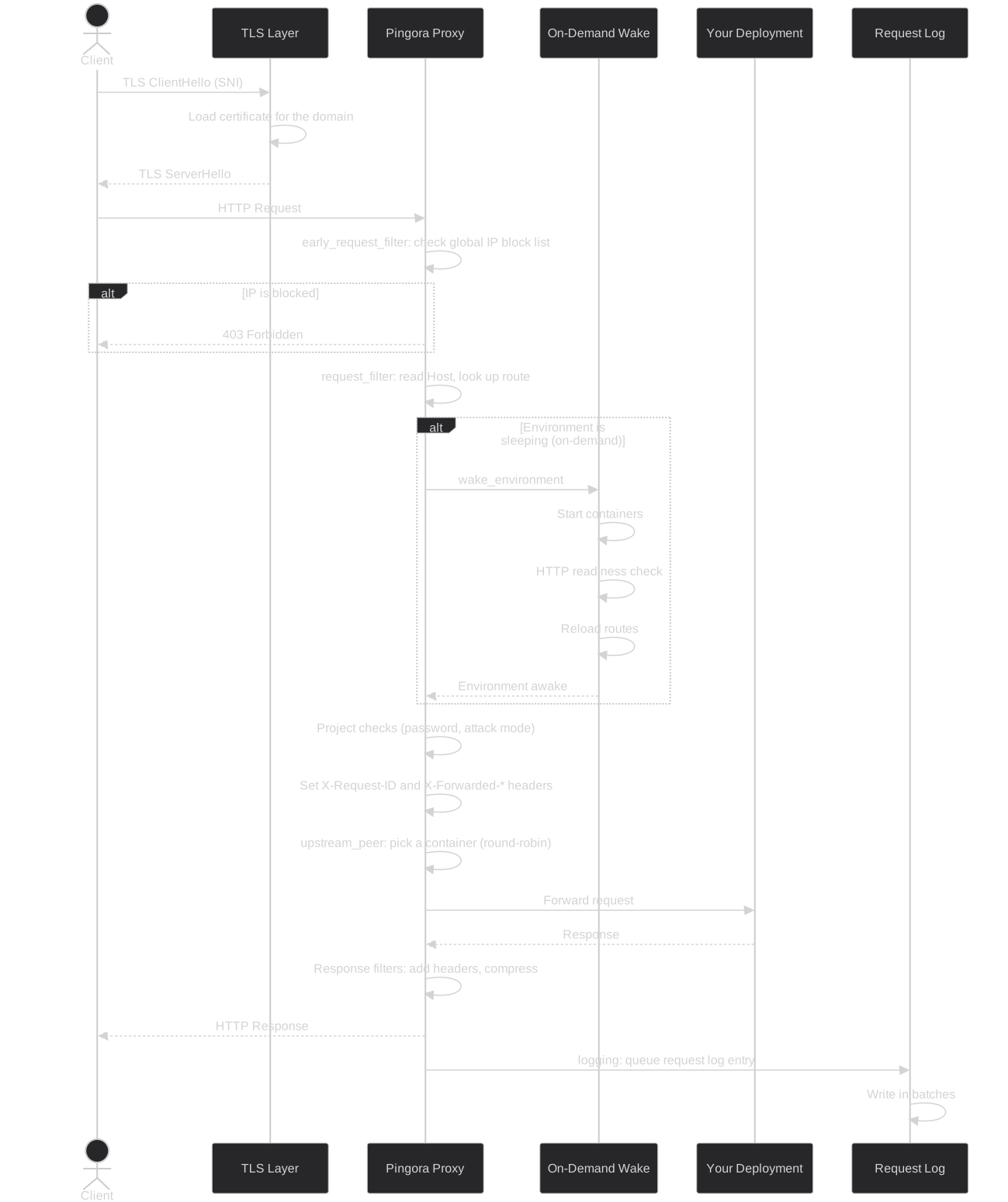
In words: the TLS layer picks the certificate from the SNI name, then the proxy rejects blocked IPs with 403, looks up the route for the Host header and wakes the environment first if it is asleep. It runs the project checks (password protection, attack mode), sets X-Request-ID and the forwarded headers, and forwards the request to one of the environment's containers in round-robin order. On the way back it adds response headers and compresses the body, returns the response to the client and queues a request log entry that is written in batches.
Processing phases
Temps implements Pingora's ProxyHttp trait. These are the hooks that do the work, in the order a request reaches them:
| Hook | What Temps does there |
|---|---|
early_request_filter | Checks the client IP against the global block list and returns 403 for blocked addresses. Decides whether the response may be compressed (not for SSE, WebSocket or other streaming requests) and whether the client asked for Markdown. |
request_filter | Sets X-Request-ID, reads the host, wakes sleeping environments, resolves the project and environment from the route table, and runs project checks: preview and password protection, and the attack-mode challenge. Sets the forwarded headers. |
upstream_peer | Picks the container that serves the request (round-robin across the environment's containers) and applies the environment's request timeouts. Hosts with no route go to the console. |
upstream_response_filter | Adjusts the response from your app, for example adding X-Served-By with the name of the container that handled it. |
response_filter / response_body_filter | Final response headers, including security headers, and the HTML-to-Markdown conversion when the client asked for text/markdown. |
fail_to_connect | Retries the request once if the proxy can't connect to the container. |
logging | Queues a request log entry. |
What the proxy does to requests and responses
- Response compression: responses are compressed for clients that accept it (level 6). Compression is turned off for SSE, WebSocket and other streaming responses.
- Markdown responses: when a client sends
Accept: text/markdown, the proxy asks your app for an uncompressed HTML page and converts it to Markdown. Your app's response is never decompressed by the proxy. - Visitor cookies: the proxy sets visitor and session cookies used by Temps analytics.
- Security headers: headers such as
Content-Security-Policy,X-Frame-Options,Strict-Transport-SecurityandReferrer-Policycome from the project's security settings or the global defaults. - Response headers:
X-Request-ID,X-Response-TimeandX-Served-By.
The proxy does not compress request bodies, decompress responses, or inject scripts or tracking pixels into your pages.
Guide: How to proxy HEAD requests correctly over HTTP/2 explains one more adjustment, dropping Content-Length from HEAD responses on HTTP/2 connections, and why it matters.
Request logging
Request log entries are sent to a bounded in-memory queue and written in batches of up to 200 entries, at least every 500 ms, to the proxy_logs table (or ClickHouse, when configured). If the queue is full, new entries are dropped rather than slowing down requests.
Project resolution
Host to Project Mapping
When a request arrives, Temps determines which project and environment should handle it:
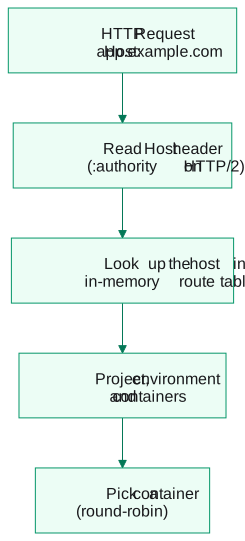
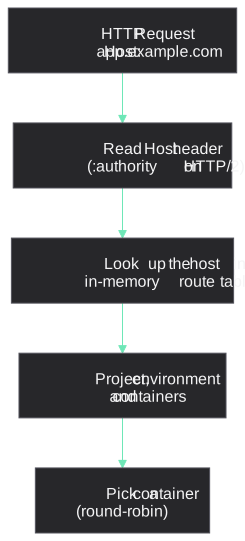
In words: the proxy reads the Host header (:authority on HTTP/2), looks the host up in its in-memory route table to find the project, environment and containers, and picks one container in round-robin order.
Resolution Steps
- Read the hostname from the
Hostheader, or:authorityon HTTP/2. TLS SNI is only used to choose the certificate. - Look up the route in the proxy's in-memory route table. The table is loaded from the database and reloaded when routes change, so requests don't query the database.
- Resolve the project and environment that the route belongs to.
- Pick a container from the environment's running containers, using round-robin.
Fallback Behavior
If no route matches the host, the request is forwarded to the Temps console, which answers it.
503 responses generated by the proxy do not include internal error detail in the response body. Error strings are written to the proxy log only — no diagnostic information is leaked to the client.
On-demand environments
On-demand (scale-to-zero) environments sleep when idle and wake automatically on the first incoming request. The wake runs inside the proxy's request_filter phase, before the route lookup, so the client connection is held open rather than rejected.
Wake Sequence
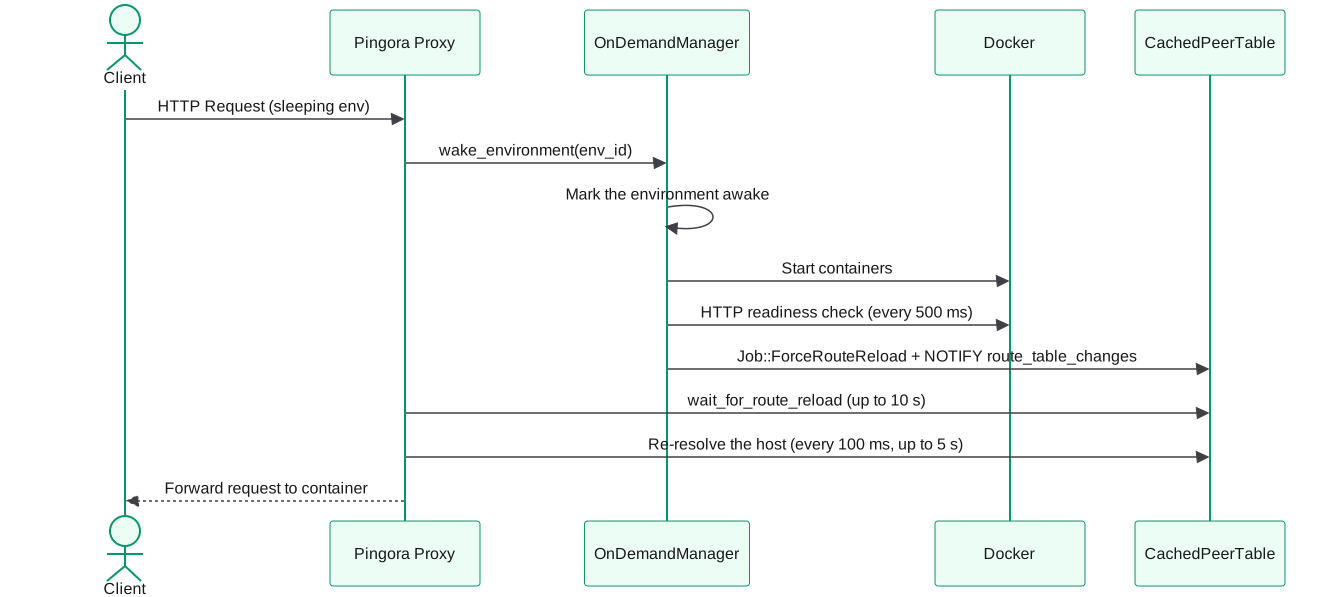
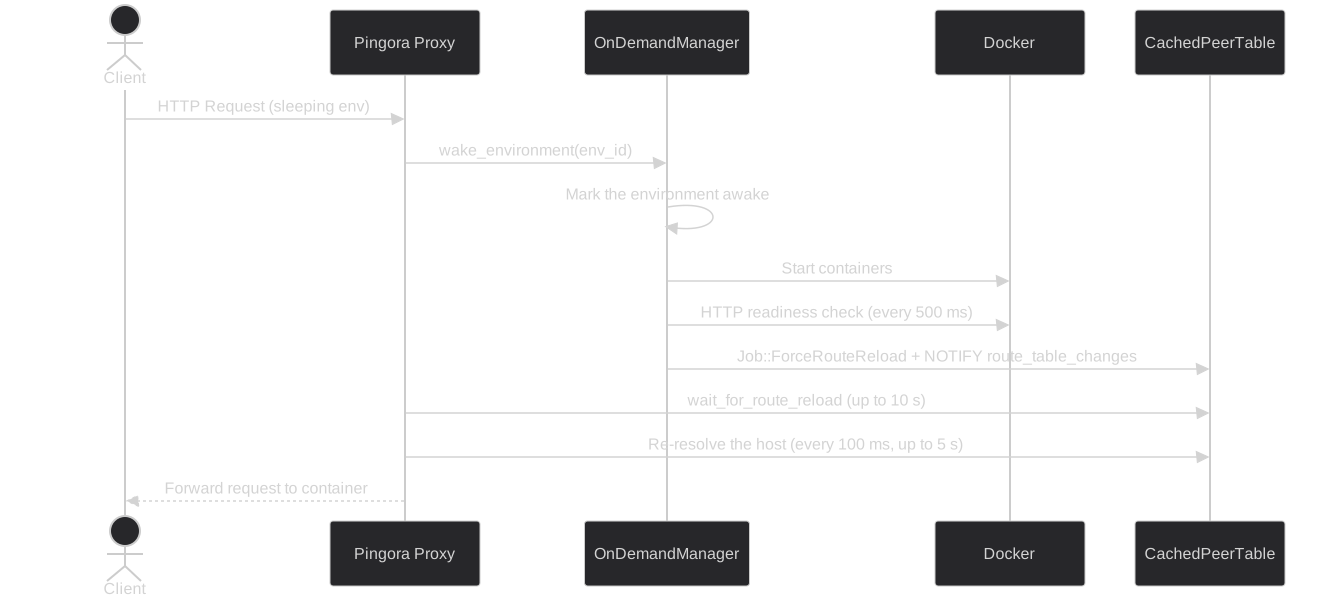
In words: when a request arrives for a sleeping environment, the proxy asks the on-demand manager to wake it. The manager marks the environment awake, starts its containers, checks HTTP readiness every 500 ms and triggers a route reload. The proxy waits up to 10 s for the reload, re-resolves the host every 100 ms for up to 5 s, then forwards the request.
- Concurrent requests for the same environment share a single wake.
- The environment is marked awake, and its containers on this node are started.
- Temps waits until each container answers an HTTP request to
/with a2xx,3xx,404or405response, checking every 500 ms, up to the environment's wake timeout (30 s by default). A plain TCP check isn't enough, because Docker's port proxy can accept connections before your app is listening. - Routes are reloaded, and the proxy waits up to 10 seconds for the reload, then re-resolves the host every 100 ms for up to 5 seconds.
First-Request Latency
The first request to a sleeping environment waits for the containers to start and pass the readiness check, plus the route reload. How long that takes depends mostly on your app's startup time.
Error Responses
| Situation | Response |
|---|---|
| The route still isn't resolvable after the wake | 503 with Retry-After: 2 and {"status":"wake_pending",...} |
| Too many requests already waiting for a wake on this proxy | 503 with Retry-After: 2 and {"status":"wake_pending",...} |
| The wake failed | 503 with Retry-After: 5 and {"status":"wake_failed",...} |
The proxy lets at most 256 requests wait for wakes at the same time. Requests beyond that get the immediate 503 above instead of being held, which caps memory and connection use during traffic spikes on scale-to-zero environments.
Wake in Split Mode
In split mode the temps proxy process runs the OnDemandManager and starts containers through the local Docker socket. It then signals the route change with NOTIFY route_table_changes and waits for its own route table to pick it up. If Docker isn't available to the proxy process, on-demand wakes are disabled there.
Route table propagation
The proxy maintains an in-memory route table (CachedPeerTable) that maps hostnames to containers. How that table stays fresh depends on the process mode.
Combined Mode
After a deployment completes, the console publishes Job::ForceRouteReload on the in-process queue. RouteReloadSubscriber picks it up, calls load_routes() (a full reload from the database), and publishes a RouteTableUpdated confirmation.
The deploy pipeline waits up to 60 seconds for that confirmation before removing the old containers, so the new route is live before the old containers disappear. If the confirmation doesn't arrive in time, the deployment is reverted to the last successful one and the old containers are kept.
This path does not rely on NOTIFY, so it works even if the PostgreSQL LISTEN connection is temporarily dropped.
Split Mode
In split mode, route updates reach the proxy only through PostgreSQL NOTIFY, on two channels:
route_table_changes, handled byRouteTableListener. It reconnects and reloads when the connection reports an error, but has no periodic refresh, so a connection dropped silently (for example by a NAT idle timeout) misses notifications.project_route_change, handled byProjectChangeListener. When the channel has been quiet for 60 seconds it does a full reload anyway, which limits how stale the table can get.
The deploy pipeline's RouteTableUpdated confirmation comes from the console process's own copy of the route table, so in split mode it doesn't prove that the proxy has reloaded yet.
Summary
| Combined mode | Split mode | |
|---|---|---|
| Route update mechanism | In-process Job::ForceRouteReload | PG NOTIFY on route_table_changes and project_route_change |
| Propagation delay | No network round-trip | ~100–400 ms (design estimate) |
| If the LISTEN connection drops silently | Not applicable | Full reload within 60 s through project_route_change |
| Who wakes sleeping environments | The combined process | The temps proxy process |
Security checks
IP Access Control
Before anything else, the proxy checks the client IP against the global block list:
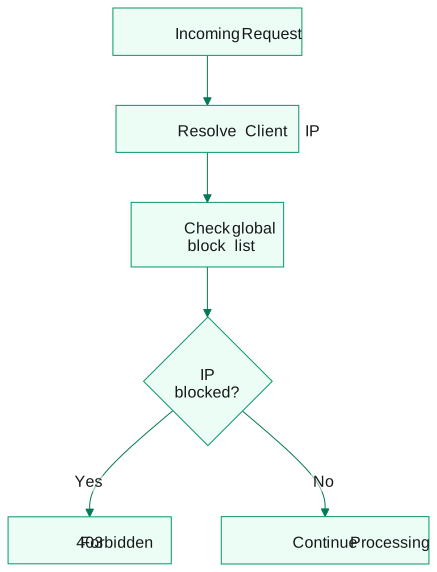
In words: the proxy resolves the client IP and checks it against the global block list; a blocked IP gets 403 Forbidden, and any other request continues.
IP Rules:
- Block rules (single IPs or CIDR ranges) apply to every project and return
403 Forbidden. - Allow rules can be saved but currently have no effect.
- There are no per-project IP rules in the free binary.
- Default: all IPs are allowed.
Rules are managed under Settings → Security → IP Access Control; see IP access control.
Premium: a request firewall and IP allow/deny lists per project and per environment are part of the Enterprise Edition. See Premium.
Attack Mode Challenge
When attack mode is on for a project or environment, visitors must complete a challenge before reaching your app:
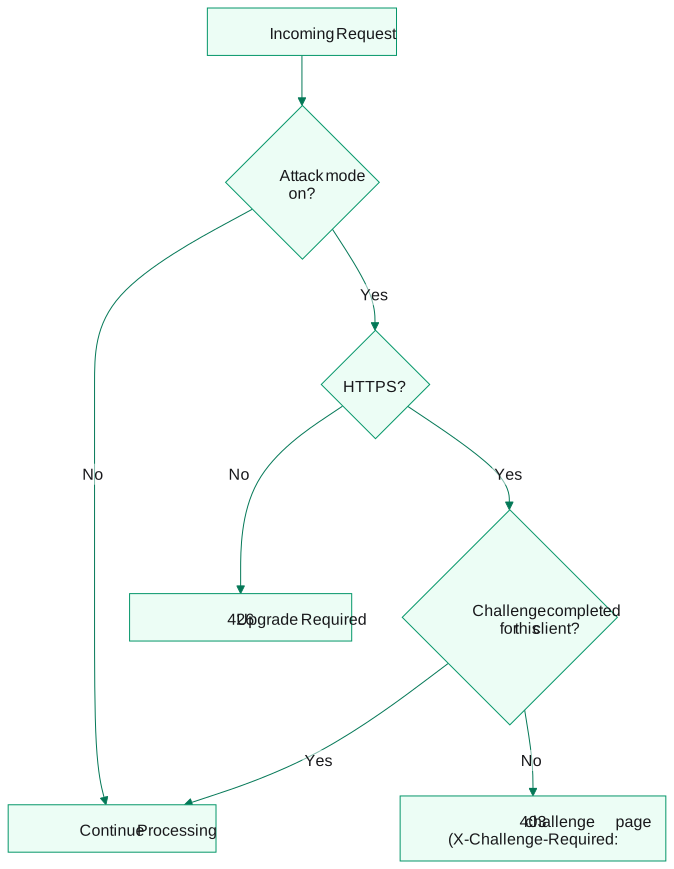
In words: with attack mode off, the request continues. With it on, a plain HTTP request gets 426 Upgrade Required; an HTTPS client that has already completed the challenge continues, and any other client gets a 403 challenge page with the X-Challenge-Required: true header.
- Attack mode is the only trigger. The challenge isn't shown based on new IPs, traffic patterns or rate limits.
- It requires HTTPS, because the client is identified by its TLS fingerprint (JA4). Plain HTTP requests get
426 Upgrade Required. - A completed challenge is remembered per environment for that client.
The only rate limits in the proxy apply to repeated failed attempts at preview and password-protected pages.
Request Headers Added
Temps sets these headers on requests forwarded to your deployment:
X-Request-ID: unique identifier for this request (also returned in the response)X-Forwarded-For: the client IP as resolved by TempsX-Forwarded-Proto: the original protocol (httporhttps)X-Forwarded-HostandX-Forwarded-Port: the public host and port the client usedHost: the public host
The client-supplied Forwarded, X-Real-IP and CF-Connecting-IP headers are removed, so your app can't be given a forged client IP through them.