
How to Track AI Crawler Traffic on Your Website

To track AI crawler traffic, classify User-Agent strings in server or reverse-proxy logs, then group matching requests by agent, provider, page, purpose, time, and response status. Treat the result as observed request activity—not proof of training, indexing, or citation.
You can do this with nothing more than an access log and a few shell commands, as shown below. Temps does the same classification at the proxy layer: there is no browser script to install and no client-side event to wait for. When a request passes through the Temps proxy, the request log can be classified as a known AI agent and shown in the project's Analytics view.
The result is useful evidence. It is not proof that a model trained on the page, included it in an answer, or cited it to a user.
What AI crawler analytics can answer
A good crawler dashboard should answer four concrete questions:
- Which recognized crawler identifiers appeared in requests?
- How many requests carried each identifier?
- Which paths did those requests target?
- Did those requests receive successful responses or errors?
That is enough to spot patterns such as requests carrying one provider's identifiers repeatedly hitting an old URL, an important guide receiving no recognized crawler traffic, or recognized crawler traffic concentrating on low-value archive pages.
It also keeps the metric honest. A request count is a request count. Calling every request an "AI visit," "citation," or "training event" adds a conclusion the log cannot support.
How Temps identifies AI agents
Temps compares the incoming User-Agent header with an ordered taxonomy of known identifiers. A match is stored with a canonical agent name, provider, and broad purpose.
The order matters. A specific identifier such as OAI-SearchBot must be matched before a generic token such as openai/, otherwise distinct traffic gets collapsed into one bucket.
The current taxonomy groups identifiers into several broad purposes:
| Purpose | What it means in the dashboard | Examples |
|---|---|---|
| Training | The published identity is associated with model-training collection | GPTBot, ClaudeBot |
| Search | The identity is associated with search or answer retrieval | OAI-SearchBot, Claude-SearchBot, PerplexityBot |
| User fetch | The published identity is associated with user-initiated retrieval | ChatGPT-User, Claude-User, Perplexity-User |
| Mixed | The same identifier may support more than one product surface | Googlebot, Bingbot, GoogleOther |
The purposes come from each vendor's own crawler documentation: OpenAI's crawlers, Anthropic's crawlers, Perplexity's crawlers and Google's crawlers. Vendors add and rename identifiers, so check those pages when a new token shows up in your logs.
These labels describe the published purpose of the identifier. They still do not prove what happened after your server returned the response.
How to track AI crawlers in any server log
You do not need a dedicated product to start. If your server or reverse proxy writes an access log with the User-Agent in it, you can count crawler requests by identifier, path and status code.
With nginx's default combined log format, the request line is the second quoted field, the status code follows it, and the User-Agent is the sixth quoted field:
# Requests per AI crawler identifier, status code and path
BOTS='GPTBot|OAI-SearchBot|ChatGPT-User|ClaudeBot|Claude-SearchBot|Claude-User|PerplexityBot|Perplexity-User'

awk -F'"' -v bots="$BOTS" '$6 ~ bots {
  split($2, req, " ")      # "GET /path HTTP/1.1"
  split($3, st, " ")       # " 200 5123 "
  match($6, bots)
  print substr($6, RSTART, RLENGTH), st[1], req[2]
}' /var/log/nginx/access.log | sort | uniq -c | sort -rn | head -50
Each output line is a count, the matched identifier, the status code and the path. Drop the path from the print statement to get totals per identifier, or keep only st[1] to see how many crawler requests are failing. Caddy writes JSON logs by default, so the same grouping works with jq on .request.headers["User-Agent"][0], .status and .request.uri.
Verify the crawler is genuine
A User-Agent match only tells you what the client claimed to be. Before you treat a spike as real crawler traffic, check the source IP addresses:
- OpenAI publishes IP ranges for each crawler: gptbot.json, searchbot.json and chatgpt-user.json.
- Anthropic publishes one list for its crawlers at claude.com/crawling/bots.json.
- Perplexity publishes perplexitybot.json and perplexity-user.json.
- Google documents a reverse DNS check: look up the IP with
host, confirm the name ends ingooglebot.com,google.comorgoogleusercontent.com, then resolve that name forward and confirm it returns the same IP. Bing supports the same reverse-then-forward check againstsearch.msn.com.
Requests that claim a crawler identity but come from outside the published ranges are someone else using a familiar User-Agent. Count them separately rather than mixing them into the crawler totals.
Read the dashboard without overclaiming
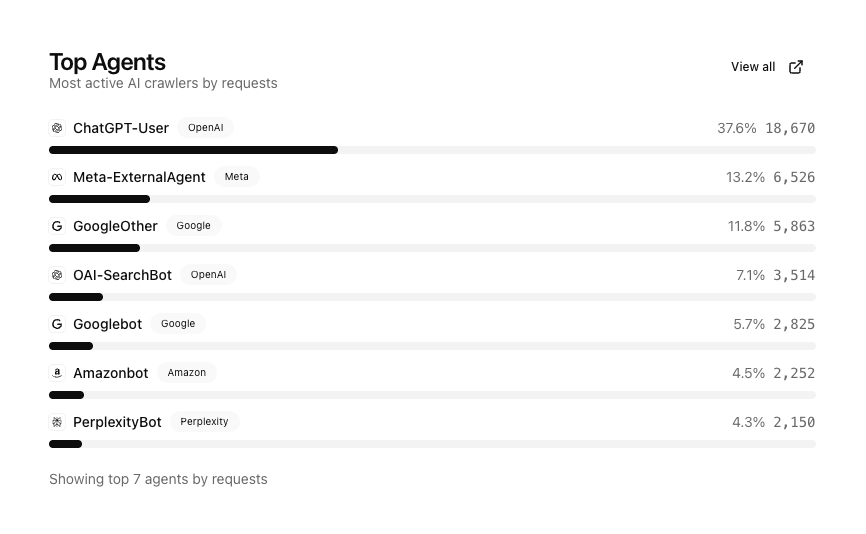
The screenshot shows a Top Agents card. For that captured period, the dashboard reports requests carrying ChatGPT-User as 37.6% of recognized-agent requests. Other rows carry identifiers associated with Meta, Google, OpenAI, and other providers.
That supports a precise statement: requests carrying those identifiers reached the site in those proportions during the selected period.
It does not tell you:
- whether the requester was genuinely the named company;
- whether returned content entered a training dataset;
- whether an answer used or cited the content;
- whether a human later clicked through from an AI product.
User-Agent strings are easy to spoof. Temps treats this classification as observability data, not authentication and not a blocking decision. If you need to know whether a request really came from the named company, use the IP checks above.
Find the paths behind the totals
Agent totals show which recognized identifiers appear most often. The page breakdown shows which paths those matching requests targeted.
Temps groups recognized requests by path and shows both request volume and the number of distinct recognized agent names seen for each page. Expanding a path reveals the per-agent counts, and the request-log drill-down lets you inspect the underlying requests rather than trusting an aggregate in isolation.
This is useful for content maintenance:
- A deprecated URL receiving repeated crawler traffic may need a redirect.
- A page returning
404or500is visible but not being served successfully. - A canonical guide receiving traffic under several duplicate paths may need consolidation.
- A new page with no requests may simply not have been discovered yet.
The final example is intentionally cautious. Absence from this view does not prove that a provider cannot access the page. It only means no matching request was recorded in the selected project, environment, and time range.
No browser SDK is required
Traditional product analytics begins in the visitor's browser, even when you serve it first-party without a third-party script. Crawler analytics cannot depend on that path because many crawlers do not execute your application JavaScript.
Temps classifies the request where it already has the necessary evidence: the reverse proxy. That gives the dashboard access to the requested path, response status, timestamp, User-Agent, and the project and environment that served the request.
This also means the feature observes only traffic that passes through the Temps proxy and reaches its request-log pipeline. It cannot report requests handled somewhere else.
Use purpose categories carefully
Purpose categories help separate very different traffic patterns:
- Requests carrying a training-oriented identifier may sweep many pages in batches.
- Requests carrying a search identifier may revisit fresh or frequently linked content.
- A user-fetch identifier may appear on a request for one specific page.
- A mixed search identifier can dominate the chart without representing AI-only activity.
That last case matters for Googlebot and Bingbot. Their indexes support traditional search as well as AI-assisted answer surfaces, so the request cannot be attributed exclusively to one use.
Treat the purpose as a useful lens for grouping traffic, not a forensic conclusion about an individual request.
A practical weekly review
You do not need another daily dashboard ritual. A short weekly check is enough for most sites:
- Compare the top recognized agent identifiers with the previous period.
- Review the most requested pages.
- Look for important paths returning errors.
- Open the underlying request logs for any surprising spike.
- Fix redirects, availability, or crawl instructions when the evidence points to a real problem.
If you publish an llms.txt, sitemap, or new group of guides, use the page view to see whether matching requests appear over time. Call that observed coverage, not verified indexing.
Crawler traffic and referred visitors are different metrics
A crawler request is a server-to-server fetch. A referred visitor is a person who followed a link from an AI product into your site. They may be related, but they are not interchangeable.
Measure them separately:
- Crawler analytics: recognized agent requests from proxy logs.
- Referral analytics: human visits with a referring source or campaign information.
- Citations: evidence collected from the answer surface itself.
Combining those into one "AI traffic" number makes it impossible to tell whether requests carry crawler identifiers, people are arriving, or answers are citing you.
Frequently asked questions
Does an AI crawler request mean my page was used for training?
No. It means a request carried a User-Agent that matched a known identifier. Even when that identifier has a training-oriented published purpose, the server log cannot prove downstream dataset use.
Can AI crawler User-Agent strings be faked?
Yes. Any HTTP client can send a familiar User-Agent string. Use the classification for traffic analysis, not authentication, authorization, or blocking decisions. To confirm a request is genuine, compare its source IP with the ranges the vendor publishes (OpenAI, Anthropic and Perplexity each publish JSON lists) or, for Googlebot and Bingbot, run a reverse DNS lookup and confirm it with a forward lookup.
Do I need to add a JavaScript analytics SDK?
No. Temps classifies these requests from proxy logs, which is important because crawlers may not run browser JavaScript.
Can I see which pages had requests for each recognized identifier?
Yes. The AI Agents view includes a page breakdown, per-agent counts for a path, activity over time, response-status summaries, and drill-downs into the matching request logs.
Does zero recorded traffic mean a page is invisible to AI products?
No. It means no matching requests were recorded for the selected scope and period. The page may be new, accessed through another route or hostname, served outside Temps, or fetched with an identifier the taxonomy does not recognize.
Count what the server can prove
AI crawler analytics is valuable because it replaces a vague question—"Are AI systems looking at this site?"—with inspectable requests, paths, timestamps, and response codes.
Keep the conclusion at the same level as the evidence. Rank recognized identifiers. Find the paths those requests targeted. Fix failed responses. Inspect surprising traffic in the logs.
Then measure citations and human referrals separately.
To set this up on Temps, see AI agent tracking in the analytics docs. The same dashboard also covers human traffic; the Temps analytics overview explains what else it records.
Get weekly updates